| < PREVIOUS | NEXT > |
RIGHT JOIN
[INCLUSIVE] RIGHT JOIN
INCLUSIVE RIGHT JOIN returns all rows from the right table, even if there are no matches in the left table. This means that if the ON clause matches 0 (zero) records in the left table; the join will still return a row in the result, but with NULL in each column from the left table. This means that a left join returns all the values from the left table, plus matched values from the right table or NULL in case of no matching join predicate.
This means that a right join returns all the values from the right table, plus matched values from the left table or NULL in case of no matching join predicate.
SYNTAX
SELECT column_name(s)
FROM table1
RIGHT JOIN table2
ON table1.id = table2.id;
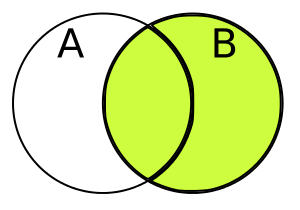
In some databases RIGHT JOIN is called RIGHT OUTER JOIN.
EXAMPLE
Consider Table 1 - “Customers”
| ID | NAME | AGE | ADDRESS | SALARY |
|---|---|---|---|---|
| 1 | Ramesh | 32 | Ahmedabad | 2000.00 |
| 2 | Khilan | 25 | Delhi | 1500.00 |
| 3 | kaushik | 23 | Kota | 2000.00 |
| 4 | Chaitali | 25 | Mumbai | 6500.00 |
| 5 | Hardik | 27 | Bhopal | 8500.00 |
| 6 | Komal | 22 | MP | 4500.00 |
| 7 | Muffy | 24 | Indore | 10000.00 |
Consider Table 2 - “Orders” Table also:
| OID | DATE | CUSTOMER_ID | AMOUNT |
|---|---|---|---|
| 102 | 2009-10-08 00:00:00 | 3 | 3000 |
| 100 | 2009-10-08 00:00:00 | 3 | 1500 |
| 101 | 2009-11-20 00:00:00 | 2 | 1560 |
| 103 | 2008-05-20 00:00:00 | 4 | 2060 |
Applying Inclusive Right Join:
SELECT  Customers.ID, Customers.NAME, Orders.AMOUNT, Orders.DATE
FROM CUSTOMERS
RIGHT JOIN ORDERS
ON CUSTOMERS.ID = ORDERS.CUSTOMER_ID;
RESULT TABLE
| ID | NAME | AMOUNT | DATE |
|---|---|---|---|
| 2 | Khilan | 1560 | 2009-11-20 00:00:00 |
| 3 | kaushik | 3000 | 2009-10-08 00:00:00 |
| 3 | kaushik | 1500 | 2009-10-08 00:00:00 |
| 4 | Chaitali | 2060 | 2008-05-20 00:00:00 |
IMPORTANT: The INCLUSIVE RIGHT JOIN keyword returns all records from the right table (Customers), even if there are no matches in the left table (Orders).
[EXCLUSIVE] RIGHT JOIN
In the case of a RIGHT EXCLUSIVE JOIN you are essentially trying to query out the unique values that exist in the right table. In other words, you don’t want any of the left table’s values, you solely want the right table’s values.
SYNTAX
SELECT column_name(s)
FROM table1
RIGHT JOIN table2
ON table1.id = table2.id;
WHERE table2.id IS NULL
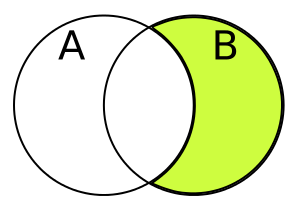
EXAMPLE
Consider Table 1 - “Customers”
| ID | NAME | AGE | ADDRESS | SALARY |
|---|---|---|---|---|
| 1 | Ramesh | 32 | Ahmedabad | 2000.00 |
| 2 | Khilan | 25 | Delhi | 1500.00 |
| 3 | kaushik | 23 | Kota | 2000.00 |
| 4 | Chaitali | 25 | Mumbai | 6500.00 |
| 5 | Hardik | 27 | Bhopal | 8500.00 |
| 6 | Komal | 22 | MP | 4500.00 |
| 7 | Muffy | 24 | Indore | 10000.00 |
Consider Table 2 - “Orders” Table also:
| OID | DATE | CUSTOMER_ID | AMOUNT |
|---|---|---|---|
| 102 | 2009-10-08 00:00:00 | 3 | 3000 |
| 100 | 2009-10-08 00:00:00 | 3 | 1500 |
| 101 | 2009-11-20 00:00:00 | 2 | 1560 |
| 103 | 2008-05-20 00:00:00 | 4 | 2060 |
Applying Exclusive Right Join:
SELECT  Customers.ID, Customers.NAME, Orders.AMOUNT, Orders.DATE
FROM CUSTOMERS
RIGHT JOIN ORDERS
ON CUSTOMERS.ID = ORDERS.CUSTOMER_ID;
WHERE ORDERS.CUSTOMER_ID IS NULL
RESULT TABLE
No table will be there because no value is able to extract as all the CUSTOMER_ID are common to ID.
| < PREVIOUS | NEXT > |